 Image 1 of 1
Everything you need to get new clients through the door, paperwork done.
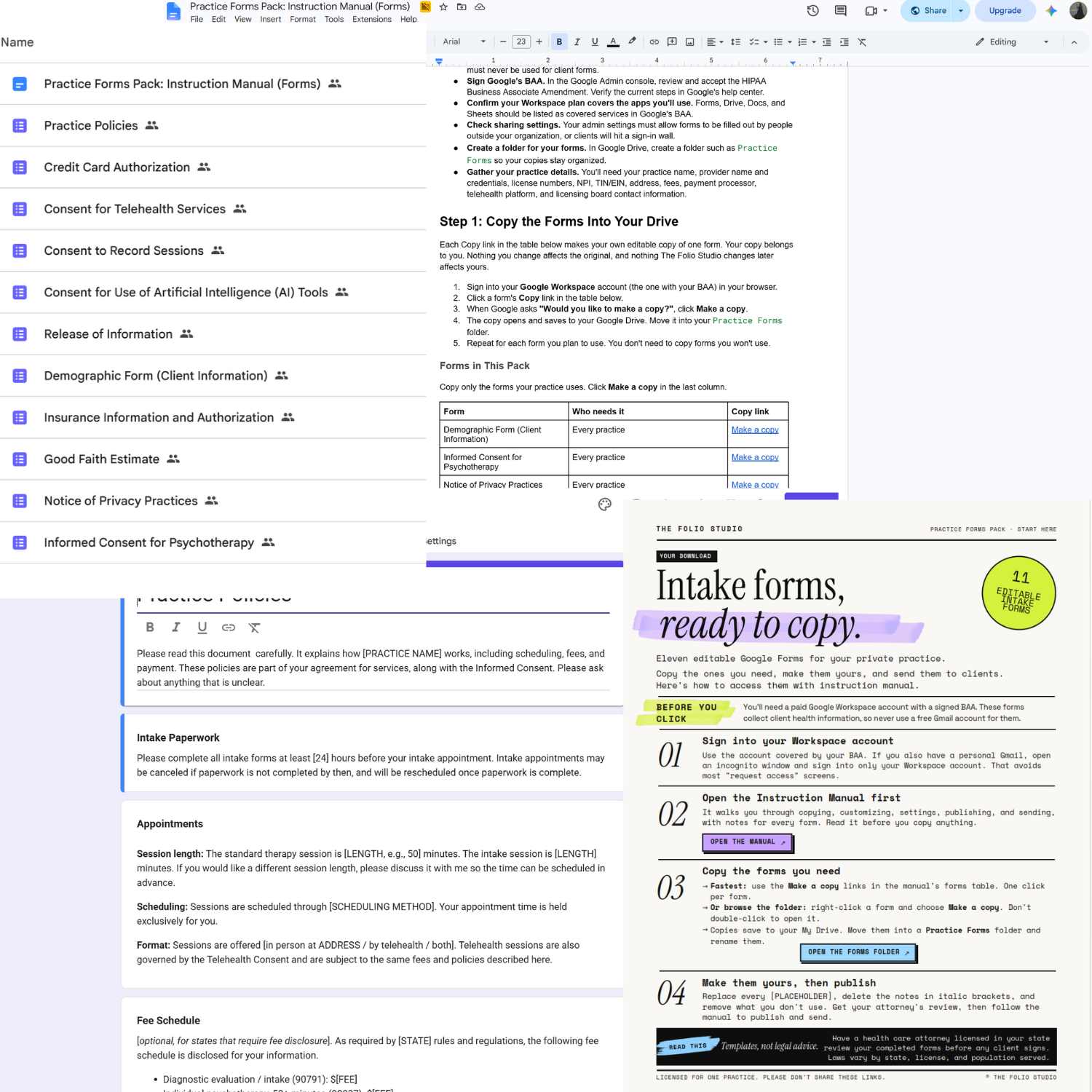
The Practice Forms Pack isn't a stack of PDFs to retype. It's 11 ready-to-send Google Forms built for private practice therapists, plus a step-by-step manual that walks you from copying the forms to sending them to clients. Whether you're opening your practice or finally replacing the paperwork you pieced together years ago, this pack gives you a clean, organized intake process without starting from a blank page.
Every form has been built out with real policy language, real consent wording, and real setup guidance. You're not getting a pretty shell to fill in from scratch. You're getting forms that are ready to customize and send, once your attorney has signed off.
-
Contact details, emergency contact, contact preferences, and optional identity questions that follow the 2024 federal standard.
-
Confidentiality and its limits, client rights, records, and an optional supervision section for associates.
-
Client acknowledgment of your HIPAA Notice of Privacy Practices, with notes on what you still need to post on your website.
-
Fees, cancellations, payment, records requests, collections, and chargeback language, all in one place.
-
HIPAA-valid authorization with expiration, revocation, and re-disclosure language already built in.
-
Authorizes charges without collecting card numbers, so you stay on the right side of PCI rules.
-
Includes the elements federal rules require, plus instructions for sending it with a pre-filled link.
-
Separate paths for in-network and out-of-network clients, including Superbill language.
-
Covers locations, technology, emergencies, and your choice of recording policy.
-
For practices that record, with storage, sharing, and all-party consent covered.
-
Plain-language consent for AI note-taking, transcription, and admin tools, written with new state laws like Illinois's in mind.
-
One-click copy links, the settings that keep clients from hitting a Google sign-in wall, publishing and sending steps, and form-by-form legal notes.
What’s included:
Your may be wondering, do I need to be a Google Forms expert?
Not at all. The Practice Forms Pack is built for therapists, not tech people. Every form is already built, labeled, and formatted. You click a copy link, swap in your practice details, and follow the manual's checklist for settings and publishing. The structure is done. The policy language is done. You just make it yours.
If you've never built a Google Form before, that's fine. If you can edit a Google Doc, you can edit these forms. The instruction manual covers every step in plain language, from copying a form to sending your first client the link. Your clients don't need a Google account either. They just click your link and fill it out on their computer or phone.
- Ready-to-send Google Forms. No retyping PDFs or rebuilding Docs. Copy, customize, publish, and send.
- One-click copy links. Every form copies straight into your own Google Drive, and you only copy the ones you need.
- No sign-in wall for clients. The manual walks you through the settings so clients can complete forms without a Google account.
- Consistent signature block. Every form ends with the same five signature fields, including who signed and their relationship to the client.
- Easy-to-find placeholders. Every spot to customize is marked in [BRACKETS], so you can search and replace in minutes.
- Compliance in mind. Form-by-form guidance on HIPAA in mind to review with your attorney, Good Faith Estimate timing, PCI rules, Medicare and Medicaid, and 42 CFR Part 2.
- Covers modern practice. Telehealth, session recording, and AI tool consent are included, not left for you to figure out.
- Signed records saved automatically. Each response saves to a linked Google Sheet, and you can save any signed form as a PDF for the client's file.
Notable features:
Still have questions?
-
Yes, you need a paid Google Workspace account with a signed Business Associate Agreement (BAA). These forms collect client health information, so a free Gmail account can't be used. The manual explains how to sign Google's BAA.
-
You'll get a PDF download right away. It has links to the instruction manual and the forms folder. Open the manual, click the copy link for each form you want, and it saves to your Google Drive.
-
No. Once you set up your forms using the manual's checklist, clients can fill them out from any device without signing in.
-
Yes. Your copies are fully yours to edit. Add, remove, or reword anything to fit your practice, license, and state.
-
These are templates, not legal advice, and laws vary by state, license, and population served. Have a health care attorney licensed in your state review your completed forms before any client signs. The manual includes tips to make that review faster and less expensive.
-
Yes. You can send the form links through your portal, by email, or from your website. If your EHR has its own intake forms, you can also copy the language from these into it.
-
No. This pack is intake paperwork only. Screening questionnaires will be a separate pack.
-
Each purchase is licensed for one practice. Please don't share, resell, or redistribute the forms, manual, or copy links.
-
Due to the digital nature of this product all sales are final. No refunds are offered after purchase. If you have questions about whether this product is right for your practice please reach out before purchasing at support@thefoliostudio.com.
Not ready yet? Start here for free.
I know investing in a new tool is a big decision. Before you commit explore the free resources: quick-start guides, cheat sheets, and tools designed to help you organize your practice without spending a dime.
Want to learn more before you dive in? The blog is packed with practical guides on running your private practice using Canva, Google Workspace, Notion and Squarespace written specifically for therapists in private practice.